

DNS Guide: Route 53 (AWS)
Step-by-step instructions for adding AgentMail DNS records in AWS Route 53.
Steps
- Log in to the AWS Management Console
- Navigate to Route 53, then select Hosted Zones
- Click on your domain’s hosted zone
- Click Create Record for each record AgentMail requires
If your domain is registered with a different registrar but uses Route 53 for DNS, make sure the NS records at your registrar match the name servers listed in your hosted zone.
Records to add
AgentMail returns the exact records for your domain in the AgentMail Console and in the records array of the Create Domain response. Always copy the values shown for your domain. For a US-region domain named example.com, the full set looks like this:
- SPF lives on
mail.example.com, not your root domain. AgentMail sends with a custom MAIL FROM subdomain, and SPF is checked against that hostname. Do not add anything to an existing SPF record on your root domain (for example one for Google Workspace or Microsoft 365). - The
mailMX must be the only MX record atmail.example.com. If another MX record exists at that host, verification reportsduplicate_records. This record carries bounces and complaints; it does not receive inbox mail. - DMARC needs a reporting address. If
_dmarc.example.comalready has a DMARC record, keep that single record instead of adding a second one, and make sure it includes arua=mailto:tag. - DKIM needs exactly one TXT record at the selector host. Remove any older record at the same selector.
- Send-only domains: create the domain with
inbound_enabledset tofalseand the receiving MX is left out, so your existing provider keeps receiving mail. - Region: EU-region domains use
eu-central-1in the MX values in place ofus-east-1. - Subdomains: names are relative to your DNS zone. For
agents.example.com, the hosts becomeagents,mail.agents,_dmarc.agents, and<selector>._domainkey.agents. - Optional records: a
linkCNAME is added whentracking_enabledis on, and a wildcard*MX whensubdomains_enabledis on. - Older domains may show three DKIM
CNAMErecords (<token>._domainkeypointing to<token>.dkim.amazonses.com) instead of one DKIM TXT record. Keep them if they already verify.
Adding the TXT records (SPF, DKIM, DMARC)
Create one TXT record for each row below:
Set Record type to TXT and TTL to 300 for each one.
Route 53 requires TXT values to be wrapped in double quotes. If you omit the quotes, the record will fail validation. If a DKIM TXT value is longer than 255 characters, split it into quoted strings on the same line of one TXT record (see Common Route 53 Issues below).
Do not add anything to an existing SPF record on your root domain. AgentMail’s SPF record goes on the mail record name, so your existing SPF for Google Workspace or another service stays exactly as it is.
Legacy orgs should keep existing working DNS records in place. For new domain setup, add the TXT selector records shown in AgentMail.
Adding the MX records (receiving and bounces)
Create one MX record for each row below:
Set Record type to MX and TTL to 300. Skip the receiving MX if you created the domain as send-only (inbound_enabled: false). The mail MX must be the only value in the mail MX record.
Route 53 MX records combine the priority and mail server in one value, separated by a space: 10 <mail server from AgentMail>. Do not wrap MX values in quotes.
If you registered a subdomain such as agents.yourdomain.com to avoid conflicts with your existing email provider, add the subdomain to every record name: agents (instead of leaving it blank), mail.agents, _dmarc.agents, and selector._domainkey.agents.
Verification
After adding all records, go back to the AgentMail Console and click Verify Domain.
Route 53 name servers typically pick up changes within 60 seconds, but full propagation to all DNS resolvers may take longer depending on TTL and resolver caching. In practice, most changes are visible within a few minutes.
Common Route 53 Issues
-
TXT records must be quoted: Unlike most DNS providers, Route 53 requires double quotes around TXT record values. If your SPF, DKIM, or DMARC TXT records are missing quotes, they won’t validate.
-
Existing SPF record on your root domain: Leave it unchanged. Do not add
include:agentmail.toor any other AgentMail value to it. If an earlier guide told you to addinclude:agentmail.to, remove that mechanism:agentmail.topublishes no SPF record, so the include causes an SPF permanent error. -
Routing policy: When creating records, use Simple routing unless you have a specific reason to use weighted, latency, or other routing policies. Other policies can cause unexpected DNS behavior for email records.
-
Multiple values in one record: Route 53 lets you add multiple values to a single record. If you need to add a second MX entry on the same name, add it as a new line in the same MX record rather than creating a separate record. This does not apply to the
mailMX record, which must hold only the AgentMail value. -
DKIM TXT record too long (CharacterStringTooLong error): DKIM public keys are often longer than the 255-character limit that Route 53 enforces per string segment. You will see an error like
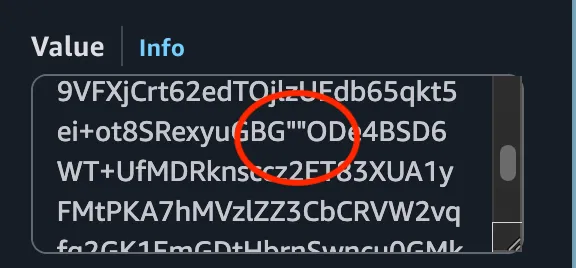
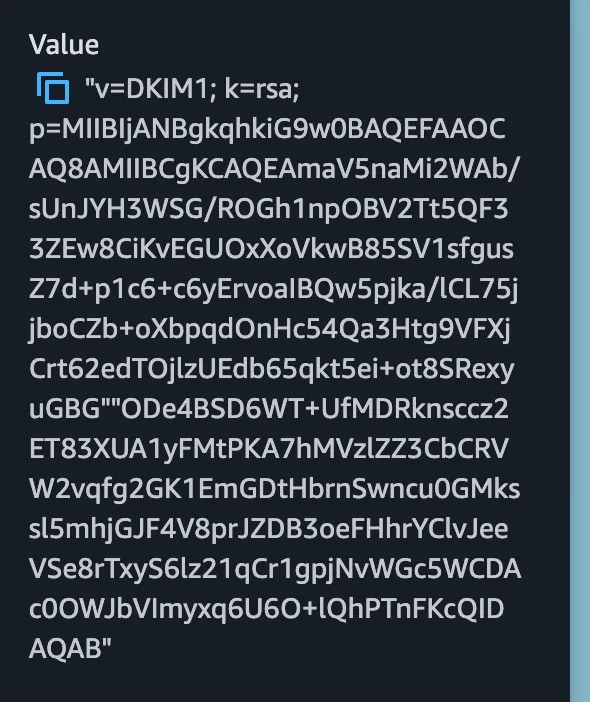
CharacterStringTooLong (Value is too long). To fix this, split the value into two quoted strings within a single record. The split point should be near the middle of thep=value. Both quoted strings must be on the same line; a space between them is fine, a line break is not. For example:Writing the strings with no space between them (
...firsthalf""secondhalf...) works too. Receiving servers join the strings back into one value either way.Incorrect: A line break between the two quoted strings. Each line in the Route 53 Value box is a separate TXT record, so the key ends up split across two records, neither of which holds the full key, and DKIM fails.
Entering the value: Both quoted strings sit on one line of the Value box.
Saved record: Route 53 shows a single value containing both strings.
You can also use the AWS CLI to add the record, which handles multi-string TXT values more reliably.